Week 12 — Camera Lab (+ Exam 2 week)
Objective
The objective of the final project is to control the UR3e to move (at least) three AR-tagged blocks to desired positions using camera image as inputs. We will use OpenCV for processing the image data. This lab is exlicitly focused on just camera calibration and block detection. The objectives are as follows - Use OpenCV functions to find the centroid of each block - Convert the pixel coordinates in an image to coordinates in the world frame using a perspective matrix
Task Description
The lab environment is shown below:
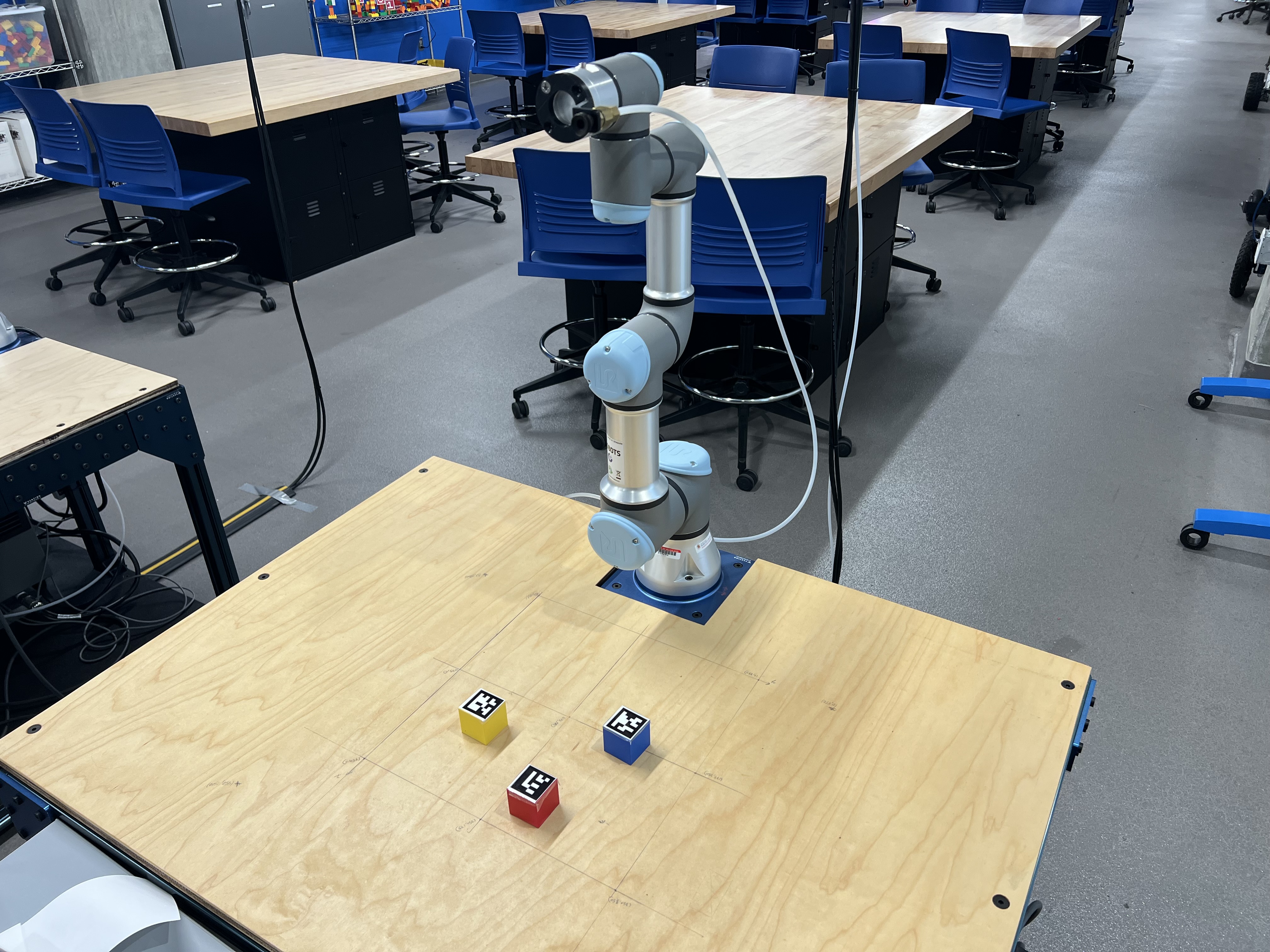
You will be given 3 blocks with different Aruco markers. Your task is to move them out of the workspace into predefined positions. To do so, you will need to find the centroid postion of the top side of each block with an image from the camera mounted above the table, facing down on the workspace. You will convert the detected pixel coordinates to the table frame using a persepctive transform.
Overview of the ROS Package
The project package should be located on the local lab machines in RAL. You can also find the package with redacted scripts here:
The nodes have been added to the setup.py file, so you do not need to add that. You will find five scripts as listed in the table below:
| Script Name | Description |
|---|---|
get_perspective_warping_with_aruco.py |
Script to create the perspective matrix |
aruco_detection_test.py |
Script to test the perspective transform and get coordinates of the blocks in table frame |
block_detection_aruco.py |
ROS Node for detecting blocks, uses the same function and changes from aruco_detection_test.py |
kinematic_functions.py |
Script to insert all of your FK and IK functions from previous labs |
main_pipeline.py |
The main pipeline to strategize and sequence movement of the blocks |
Please do not edit anything outside the given code snippets (it will lead to errors which will be difficult to identify)
For the camera lab, you just need to edit get_perspective_warping_with_aruco.py and aruco_detection_test.py only.
Procedure for Setup in RAL
Please follow the following steps before you start editing the scripts on RAL machines
Restore the package to original form and pull the latest version
Docker Initialization
- Update the repository to be on the latest commit
- Start the container (run the command from the
dockerfolder): - Once inside the container, build your development workspace:
- Source your development workspace:
- You can use
tmuxto manage multiple panes. Create panes to work as needed: tmux# Start a new sessionCtrl+A b# Split horizontallyCtrl+A v# Split vertically
Script Descriptions
You are recommended to complete each script in the order suggested in the table.
get_perspective_warping_with_aruco.py
This script will generate a perspective matrix for the camera to table frame. You need to edit one line to input the reference points on the table. Ensure that you are entering the values in mm. This script will generate a perspective_matrix.npy file in the folder.
Before you run this script, ensure that you are in the correct directory. Assuming you have already entered the docker container, run
Troubleshooting:
If you get a missing keyboard package error run the following command
Once run, you will see a window with the live camera feed. Click on the reference points in the same order that you have listed in your script. It will calulate the perspective transform and a new window will pop-up showing a blue dot at (175,175) on the table coordinate frame. If this is right, you can proceed to the next script.
aruco_detection_test.py
This script will give you a live detection of the aruco markers and their location w.r.t the table frame in real-time. You need to modify the image_frame_to_table_frame() function in the script. Use the math from prespective transforms to do the same. You can find a file discussing perspective transforms here Perspective Warp
Exit Instructions
Take a backup of you scripts and reset your scripts & repository to the original form
Notes for Final Project
You are only expected to do this for today, so that you have the scripts ready. Take backups of your scripts. We will sending the complete project details out by next week where you can simulate the project on your end and come in and test it in the lab in the subsequent weeks.